
This post continues from where I covered ADR and spec-driven development foundations. If the basics are familiar, let’s look at how the tools have evolved and what a modern AI-assisted spec-driven workflow looks like in practice.
Evolution: From OpenSpec to Brainstorm + Court
When the first ADR post went out in January 2026, I was actively using OpenSpec. Within a few months, the tools evolved but the core principle stayed the same: spec first, then code. The Court skill implements the multi-AI evaluation approach detailed in Decision Gate v2: Multi-AI Tribunal. Open source: ceaksan/decision-gate.
Current Flow
| Phase | Old (OpenSpec) | Current | What Changed |
|---|---|---|---|
| Spec creation | openspec proposal | Brainstorm skill | AI assistant creates spec via interview, iterative |
| Evaluation | Manual review | Court (Multi-AI Tribunal) | Multiple models cross-evaluate |
| Decision record | Separate ADR file | Court ADR output | Court auto-generates ADR |
| Implementation | openspec apply | Plan + Implement | Behavioral requirements, max 5/iteration |
| Archiving | openspec archive | Retro | Pattern extraction, core-rules update |
What Stayed the Same?
- Spec-first approach: Answering “what” before writing code
- ADR principle: Documenting “why” behind critical decisions
- Interview/brainstorm phase: Surfacing assumptions early
- what + why + how to verify loop
What Changed?
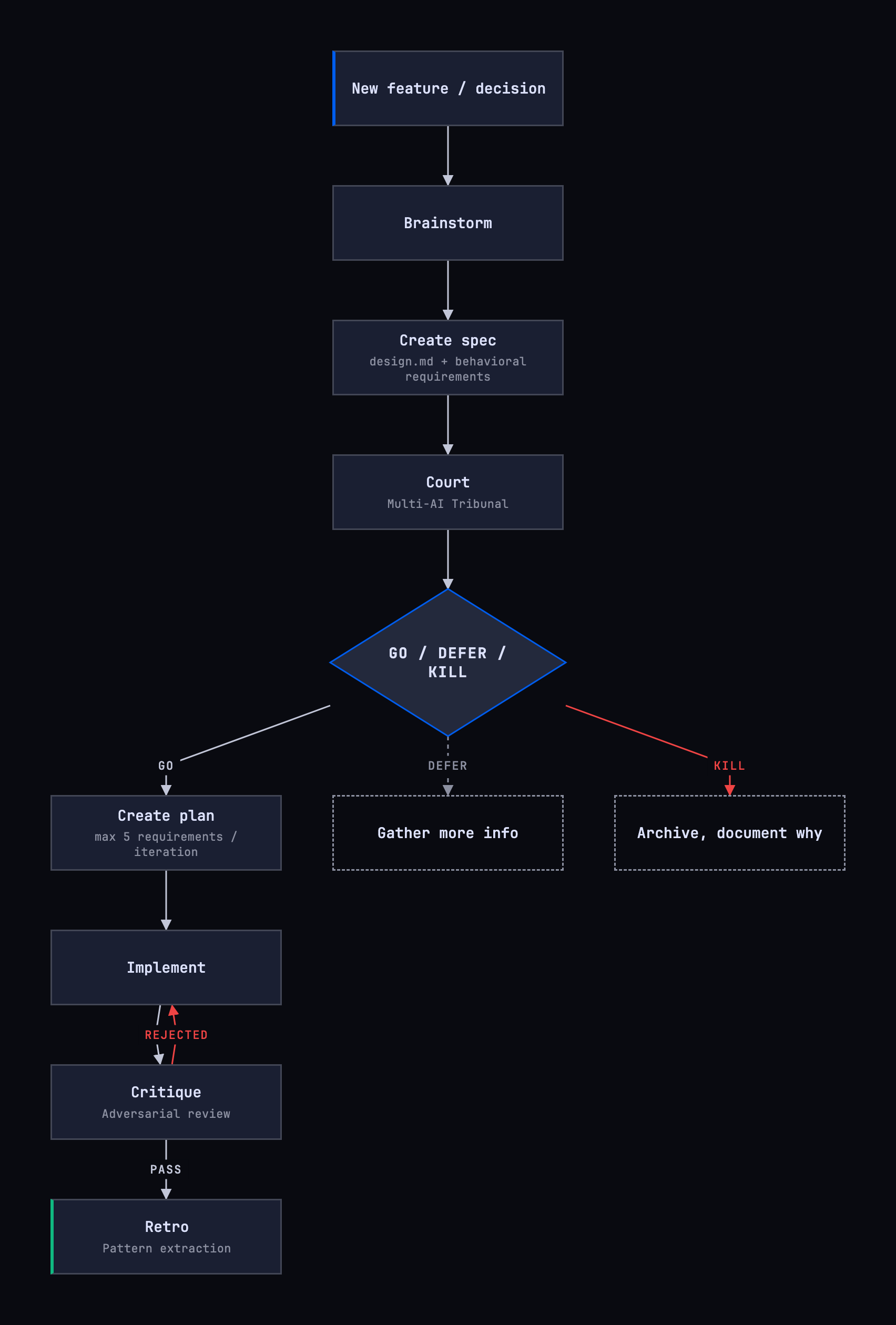
- Pipeline instead of single tool: OpenSpec was a single CLI tool, now there’s a brainstorm -> court -> plan -> implement -> critique -> retro chain
- Multi-AI evaluation: Spec is evaluated by multiple models, not a single person/model
- Automatic ADR: Court skill generates ADR output while evaluating the decision
- Pattern learning: Retro phase writes learned patterns to
core-rules
When to Use Which?
| Situation | Approach |
|---|---|
| Adding feature/capability | Brainstorm -> Court -> Plan |
| Breaking API change | Brainstorm -> Court -> Plan |
| Choosing library X vs Y | Court (with ADR output) |
| Architectural pattern decision | Court (with ADR output) |
| Technology evaluation | Breakdown |
| Bug fix | Just commit message |
Workflow with Worktree
Combining spec-driven development phases with git worktree enables parallel work. While the spec and decision flow run on main, implementation proceeds in an isolated worktree.
| Phase | Worktree? | Reason |
|---|---|---|
| Brainstorm + Court | No | Just spec/decision, can be rejected |
| Implementation | Yes | Code changes, isolation matters |
| Retro | No | Post-merge, pattern extraction |
The six-phase flow plays out in practice with these commands:
# 1-2. Brainstorm + Court (on main)
# /brainstorm -> spec is created
# /court -> GO/DEFER/KILL

# 3. Worktree after GO decision
git worktree add ../project-add-feature -b feat/add-feature
cd ../project-add-feature

# 4. Implement (in worktree)
# /implement -> plan gate + code

# 5. Critique
# /critique -> PASS/REJECTED

# 6. PR & Merge, then retro (on main)
# /retro -> pattern extraction
git worktree remove ../project-add-feature
This approach prevents conflicts on main during large features and buys you the “try experimental things during implementation” freedom, because if the worktree is rejected it just gets removed.
Practical ADR Template
To add this system to your project, two files are sufficient:
docs/adr/_TEMPLATE.md- ADR templateCLAUDE.mdor reference in project configuration
An ADR template can have this structure:
# ADR-NNN: Title

**Date:** YYYY-MM-DD
**Status:** Proposed | Accepted | Deprecated | Superseded by ADR-YYY
**Spec:** [spec-name](../specs/spec-name.md) <!-- if applicable -->

## Context

Describe the problem and current situation.

## Decision

What did we decide to do and why?

## Consequences

### Positive

- Benefit 1

### Negative

- Trade-off 1

### Alternatives Considered

- Alternative A: Why it was rejected

## Files Changed

| File              | Change                |
| ----------------- | --------------------- |
| `path/to/file.ts` | Description of change |
The Spec line is added when the decision is based on a spec document. The Files Changed table makes the scope concrete and shows which files were affected. When the Court skill auto-generates an ADR, it fills this template.
Relationship with Decision Gate
ADR and spec document the “why” and “what” of a decision. But there’s a question that comes before both: “should we?” For the framework that answers this question, see Decision Gate: The Missing Piece of Vibe Coding.
| Question | Tool | Timing |
|---|---|---|
| Should we? | Court / Decision Gate | Pre-decision |
| Why did we choose this path? | ADR (Court output) | Post-decision |
| What will we build, how will we verify? | Spec (Brainstorm) | Pre-implementation |
The pipeline’s three phases map to these three questions: Court answers “should we” and produces the ADR, Brainstorm shapes the spec, and implement + critique show “how we verified it.”
Conclusion
Tools change: OpenSpec CLI gave way to the brainstorm + court pipeline. The core principle remains: answer “what” before starting implementation, document “why” for critical decisions, and isolate large features in a worktree.
If you haven’t looked at the upstream story, why ADR and SDD have different roles, start with the foundations post. I examine how ADRs transform into executable constraints for AI agents in Living Architecture Documentation for AI Agents. You can also check out the Living Architecture project where I converted these findings into a project-agnostic template.
Further Reading
- OpenSpec - Spec-Driven Development
- Claude Code: Best Practices for Agentic Coding
- Gemini CLI Conductor: Context-Driven Development
- Git worktree documentation
- 01 OpenSpec's single-tool approach gave way to a brainstorm -> court -> plan -> implement -> critique -> retro pipeline
- 02 The court skill is a multi-AI tribunal where multiple models cross-evaluate, not a single model verdict
- 03 Git worktree isolates the implementation phase from main, enabling parallel work
- 04 The retro phase writes learned patterns into core-rules and iteratively improves the process
- 05 A commit message is enough for a bug fix; the pipeline is for new capabilities and architectural decisions
+ Is OpenSpec still usable?
It still works, but today's AI assistants offer more integrated brainstorm/plan/critique capabilities. The spec-first principle hasn't changed, the tools became smoother.
+ What does the court skill actually do?
It routes a spec or decision proposal to multiple AI models (a tribunal) for cross-evaluation. Output is a GO, DEFER, or KILL verdict plus an auto-generated ADR file.
+ Do I need a worktree for every feature?
No. Small fixes and single-file edits can stay on main. Worktree is meaningful for multi-day, multi-file, or experimental features.
+ Is the retro phase really necessary?
Skip it and the learning is lost. Retro writes the patterns that emerged from the work (which mistake repeated, which shortcut worked) into core-rules and improves the next iteration.
+ Which tools does this flow run on?
Directly with Claude Code's skill system: /brainstorm, /court, /plan, /implement, /critique, /retro. Similar pipelines can be built as custom commands in Cursor or Gemini CLI.