
In Shopify, GA4 (Google Analytics 4) and Google Ads signals can come from different layers: the storefront where the theme code lives, one or more app pixels, one or more custom pixels. Picking apart which signal came from which source and what it carries one by one in DevTools, and reading each layer’s consent state separately, can become an unnecessary burden.
There are many tools for debugging, but the prominent ones are mostly aimed at technically skilled users. That makes it harder to summarize the situation in a screenshot or in a conversation with a client. What I needed was a way to hand the result to a client with limited technical knowledge in a form that is easy to follow. At some point, after answering similar questions again and again for the clients I consult for, I wrote a measurement debugging tool to make communication between the parties easier: Inspect Signals, a Chrome extension. This post covers what the tool reads and how it organizes the findings.
The examples below are based on my observations in client projects and on a test setup I recreated from them. They should not be read as general values that hold for every Shopify store.
Same Signal, Different Layers
I recreated a structure I had observed in client projects as a similar test setup, so as not to use client data directly and to be able to examine it in more detail. In this setup, the same order number reached three GA4 properties and two Ads accounts through different layers. The distribution was as follows:
| Layer | Sent |
|---|---|
| Storefront and checkout | purchase to two GA4 properties |
| Custom pixel | purchase to a third GA4 property, two conversion labels to one Ads account |
| App pixel | One conversion label to another Ads account |
Remarketing and audience hits went out alongside these. The question “Did purchase fire once?” therefore has no single answer: it depends on which property, which account and which layer. The layers also report their own consent states, and those states can differ from each other (see Consent Mode Conflict below).
Finding the Source in DevTools
Shopify runs pixels inside either a Lax or a Strict sandbox, and app pixels are loaded in a strict sandbox.1 The initiator of requests sent from a sandbox iframe shows as null. A hit coming from the page’s own code and a hit coming from a pixel sandbox end up mixed in the same list. In the client setups I observed, finding the source in DevTools means opening the request’s Initiator tab, looking at the Request call stack area and searching for the shop_events_listener line.
The pixel’s source is read from the address of the frame that sent the request. Pixel sandbox addresses live under the store’s domain and follow this pattern:
- App pixel:
/web-pixels@<build>/app/web-pixel-<id>@<hash>/sandbox/modern/<page path> - Custom pixel:
/web-pixels@<build>/custom/web-pixel-<id>@<version>/sandbox/modern/<page path>
Separating a hit’s source, its payload and its consent parameters (gcs, gcd) by hand becomes unsustainable when repeated across a shopping flow that, in my observation of client projects, can produce hundreds of hits.
The Same Information in the Panel: Layer and Order Card
Inspect Signals works only on stores that have been granted access; on first use it needs Grant access and then Reload page. The panel groups the tab’s hits page by page and states each hit’s source: Storefront, App pixel <id>, Custom pixel <name> (<id>) or another iframe. A custom pixel shows its name when the store page lists its pixels; app pixels are listed by id only. This makes it easy to tell which layer a piece of data came from.
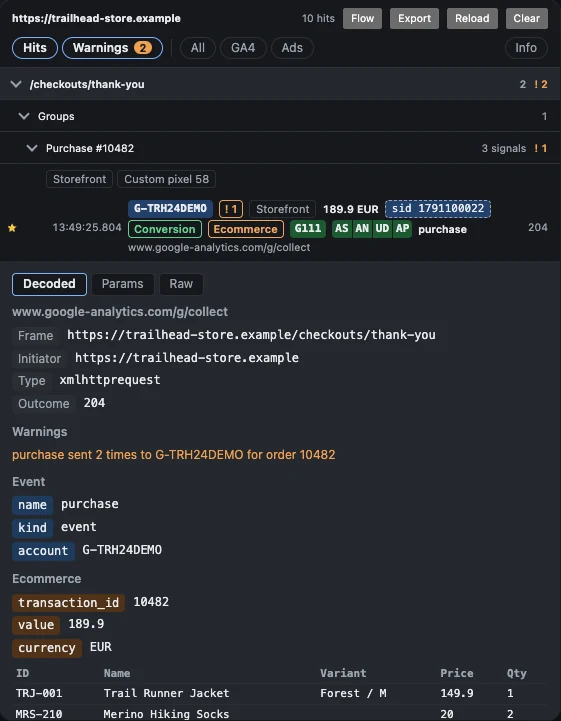
Signals that carry the same identifiers are collected into a single order card at the top of each page. The card shows side by side which signal went out from which layer, with which value. Google Ads states that a transaction ID must be unique for each transaction.2 When grouping, an Ads oid value that starts with GG_ is a per-hit identifier and does not count as an order key. For conversion hits that send no oid, approximate grouping is done on the same page within a short time window, and that card appears only when a rule flags the group.
Information read at row level:
| Item | What it shows |
|---|---|
G- and AW- chips | GA4 property or Ads account, each ID keeps the same color across the panel |
| Badge | Conversion, Remarketing, Ecommerce |
| Marker | Star (conversion), person (hashed user data), curly braces (Ads data parameter) |
gcs and gcd chips | The consent state the hit reports |
sid chip | GA4 session ID, new label on a new session |
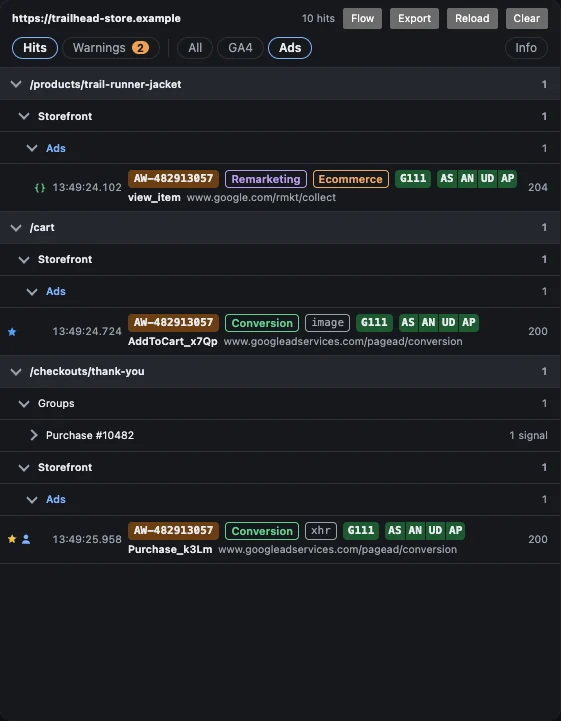
Clicking a row opens the Decoded, Params and Raw tabs. On Shopify stores, Decoded also shows the cart, checkout_url, checkout_token, order_id and Shopify consent state read at that moment.
Which Inconsistencies Count as Warnings
Multiple signals from different layers in the same order group is not a warning on its own. Different labels can be intentional multiple conversions. The extension runs 13 rules, and some of them are:
| Rule | What it catches |
|---|---|
| duplicate | The same GA4 event, or the same Ads label, sent to the same ID more than once |
| value-mismatch | Different value or currency within the same order group |
| items-total | GA4 purchase value does not match item price times quantity minus discount; info rather than warning when only a coupon code is sent |
| item-data | Different item ID, name or price across signals (info) |
| purchase-no-id | purchase sent without a transaction_id |
| purchase-missing | A page with a completed Shopify checkout that sent no purchase (Shopify only) |
| consent-conflict | One signal sets a purpose to granted while another sets it to denied within the same order group |
In a discounted order in one client project, I saw the items total come out as 598 and value as 0. Only one property sent the discount amount separately. The rule subtracts the discount when a discount amount is sent, and records an observation when only a coupon code is present.
Warnings do not diagnose the cause; they state the observed value. The Warnings filter in the panel lists only the hits that carry a warning.
Consent Mode Conflict
Layers can report different consent states for the same visitor. In a client project, I saw gcd=13l3l3l3l3l1 on hits sent from the storefront. This value means none of the four consent signals was set. On the same page, hits sent from pixel sandboxes carried gcs=G111 and granted codes inside gcd. The extension’s Shopify consent rule flags a hit as a warning when it is granted or carries no consent mode information for a purpose Shopify has not allowed, and as info in the opposite case.
Two notes:
- The
gcddecoding is not a specification published by Google; it relies on a table compiled through reverse engineering.3 When a letter is not recognized, the answer is “unknown” instead of a guess. - In the setup I observed, the most reliable source for reading Shopify’s own consent state was the sandbox’s
initdata4 and its consent update messages. The Customer Privacy API also publishes thevisitorConsentCollecteddocument event whenever consent changes.5
Handing Findings to the Client: Flow and Export
There are two ways to show the findings to a client. The first is showing the panel in a screen recording: new rows are briefly highlighted and group headers stay fixed while scrolling. The second is the Flow page:
- Journey: a Sankey of the pages in visit order; bands are colored by page, consent or session.
- Breakdown: the distribution across page, source, GA4 property or Ads account, event and consent.
- Timeline: one lane per property or account,
sidsegments and the moments consent changed.
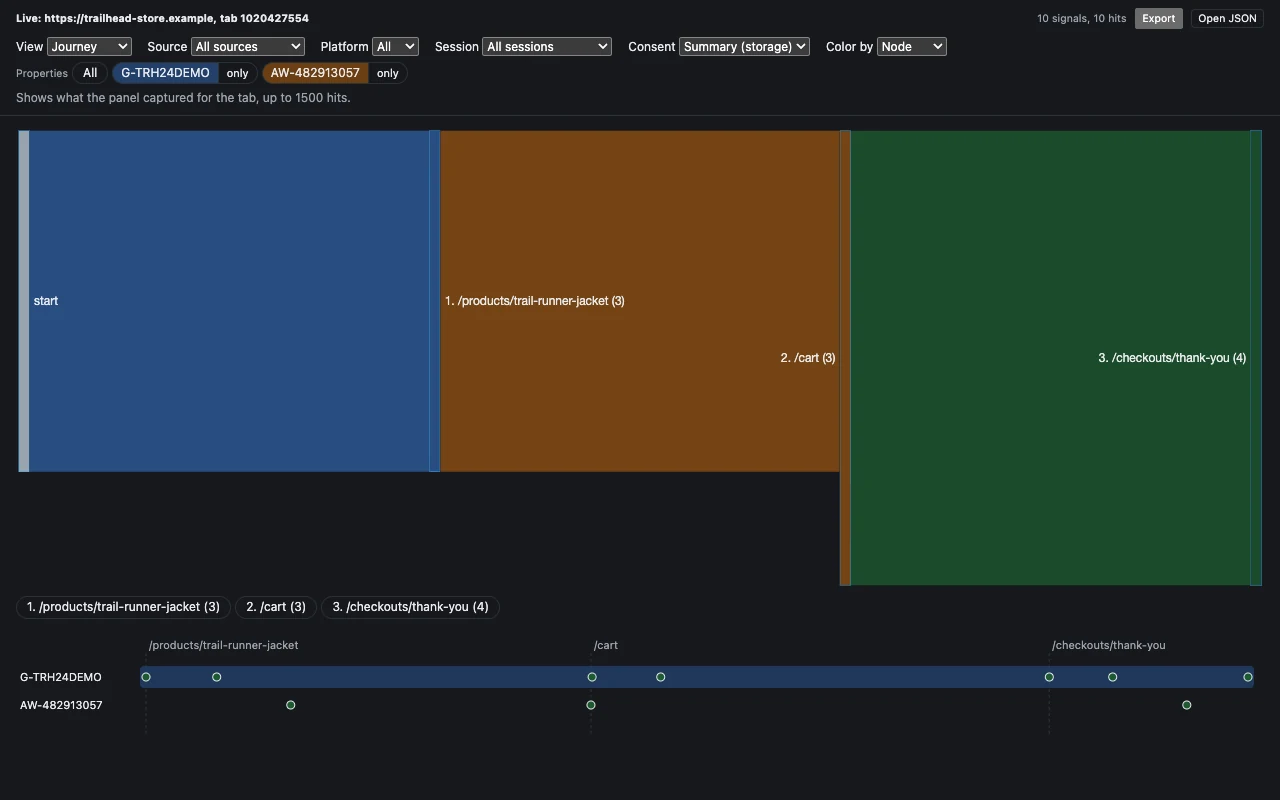
Properties the store does not own can be removed from the filter; the choice is remembered per store. Export saves the recording as JSON, and Open JSON on the Flow page shows the same recording again later. That way a meeting with a client can look at the same recording without placing another order.
Limits of the Method (For Now)
- Server-side GTM (Google Tag Manager) and first-party collection endpoints are not visible. The hit that was sent is visible; what the server did with it is not.
- “Did Google accept this hit?” stays unanswered. Only what the browser sent and the HTTP result are known.
- Pixels running inside workers cannot be observed. Reading customer events depends on the presence of sandbox iframes. It works on pages with at least one custom pixel or iframe-based app pixel.
- Reading customer events depends on Shopify’s internal message format. I could not find it documented as a public interface; if it changes, the reading breaks.
- Records are kept in session storage: they are deleted when the tab or the browser closes. Each tab keeps the newest 1500 hits; hits beyond the limit are left out of comparisons and warnings.
- Observations belong to individual setups. Pixel distribution and consent flow may differ on another store.
Related Posts
- Shopify Analytics vs GA4: Why Do They Show Different Numbers?
- Connecting a Shopify Order to an Ad Click: Choosing a Join Key for Offline Conversions
- Shopify Facebook & Instagram App + Multiple Pixels: The Global Track Bug and Duplicate Events
- Google Ads Conversion Double Counting on Shopify: Diagnosis with the Webpages Report and the Checkout Token
- Tracking dataLayer and Extra Variables per Frame in Shopify
Project page of a Chrome extension that reads GA4 and Google Ads hits from the storefront, app pixels and custom pixels, along with their payload and consent state, in a single panel.
Go to Project PageFootnotes
- Web Pixels API (Shopify). “For app developers integrating app web pixels, pixels are loaded in a strict sandbox.” The page also states that pixels run within “one of our Lax or Strict sandboxes”. ↩
- Use a transaction ID to minimize duplicate conversions (Google Ads Help). “The transaction ID must be unique for every single transaction and must be dynamically generated by your website’s backend or e-commerce platform for each purchase.” ↩
-
Consent Mode Decoder by DWC. The source used for the position and letter decoding of the
gcdvalue; it is not a specification published by Google but a reference compiled through reverse engineering. ↩ -
init standard API (Shopify Web Pixels API). The
customerPrivacyfield is defined on this page. ↩ -
Customer Privacy API (Shopify). “The Customer Privacy API publishes the document event
visitorConsentCollectedwhen consent changes.” ↩
- 01 In Shopify, GA4 and Ads signals can come from different layers (the storefront, one or more app pixels, one or more custom pixels); which source a hit came from is not written on the hit, and its payload and consent state have to be read parameter by parameter.
- 02 A sandbox frame address carries the pixel type and ID; source detection relies on the
/web-pixels@.../app|custom/web-pixel-<id>@...pattern. - 03 Order signals are collected into a single card by
transaction_id; an Adsoidvalue that starts withGG_is a per-hit identifier and does not count as an order key. - 04 The warning rules answer 'what was sent'; 'what Google accepted' and sGTM stay outside this view.
- 05 A recording can be exported as JSON and reopened on the Flow page; a screen recording or a file is enough for talking to a client.
+ Why isn't the source of a Shopify custom pixel hit directly visible in DevTools?
The initiator of requests sent from a sandbox iframe shows as null, so the request cannot be tied directly to a page source. The source is read from the address of the frame that sent the request: the /web-pixels@.../custom/web-pixel-<id>@... pattern in the address gives the pixel type and ID.
+ Is it an error when different properties send different item IDs and names for the same order?
Not on its own. In stores that use Shopify Markets, or in properties tied to different data sources, item ID and item name values can differ. Inspect Signals flags this difference as information, not as an error.
+ Does this method also show hits sent through server-side GTM?
No. The method reads the requests the browser sends to Google addresses. Requests sent to a first-party collection endpoint, and what Google accepts on the server side, are outside this view.
+ Is the recorded data sent anywhere?
No. The extension has no server; records are kept in the browser's session storage and deleted when the tab or the browser closes. Export writes a file only when the Export button is pressed.