
In most setups the consent side of Clarity is considered handled once a consent condition is placed on the GTM (Google Tag Manager) tag. Since 31 October 2025 that is no longer enough, and the symptom of it not being enough is quiet: Clarity does not shut down, it fragments sessions. Session counts rise in the report, funnels show a total drop at every step, and realising this has to do with the setup can take a long time.
This post reports findings from a single example. It covers the scope of enforcement, what happens to the report when no signal arrives and the difference between the gate and the signal on the GTM side. It then turns to the ad consent that the old consent call opens, and to why the Google Consent Mode (GCM) promise in the documentation did not hold on a live site. I settled two questions the documentation never answers by measuring them: whether a site can rebuild a fragmented session by supplying its own session identifier, and whether ad consent really stays closed when the two consent categories are sent separately. The Umami counterpart of the same problem is in setting up Umami with GTM in a consent compliant way; the effect of consent on Clarity data at the analysis level is in the frustrated buyer analysis. What a fragmented session does to heatmap reading is covered in how to read and interpret heatmaps.
What Changed on 31 October 2025
Clarity expects a valid consent signal for page visits originating from the EEA (European Economic Area), the UK and Switzerland. It determines the region from the visitor’s IP address; where the site is hosted or where the company sits does not change the scope.1 The documentation says this introduces no new consent requirement, it makes it mandatory for existing mechanisms to actually deliver the signal to Clarity.2
Three details shape the setup. Clarity processes the signal per project, so every domain running more than one Clarity project passes the signal separately. It treats a consent as valid for at most 9 months. Consent Mode, meanwhile, is on by default for visitors from those three regions; for everyone else Clarity writes a cookie on the first load unless the project’s Settings > Setup > Advanced settings > Cookies option is turned off.3
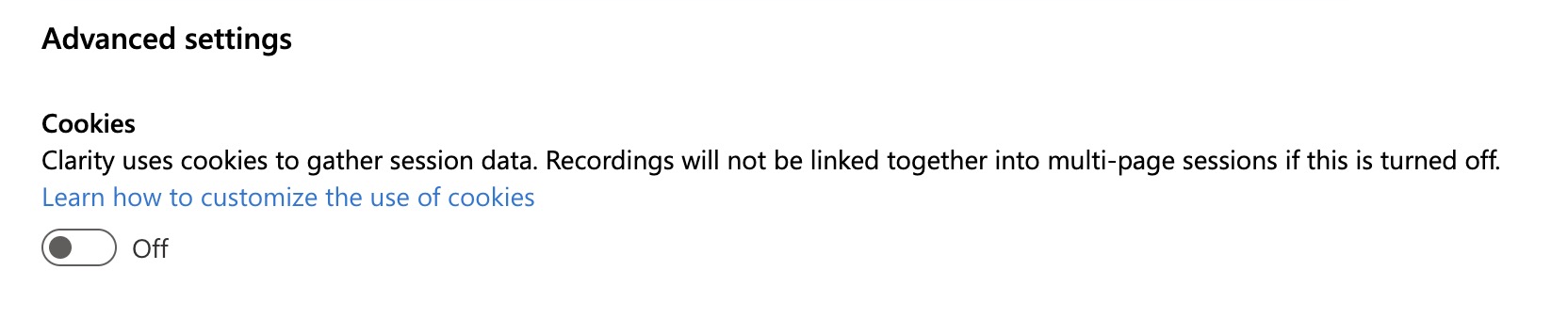
The setting’s own description confirms the outcome: when it is off, recordings are not linked together into multi-page sessions.3 So although this toggle looks like a cookie preference, what it really decides is session integrity.
The third item matters for setups in Türkiye. Clarity does not enforce on Turkish traffic, so a project with the Cookies setting on keeps working independently of the banner. That gap does not show that an analytics cookie may be written without consent under KVKK (the Turkish Personal Data Protection Law). A technical constraint and a legal obligation are separate things; Clarity only applies the first, the second stays with you.
What Happens When There Is No Signal
Without a cookie Clarity cannot stitch a session together and assigns a separate identifier to every page view. The breakage table in the documentation runs to 23 rows; the root cause is a single sentence and the rest follows from it.4
| Field | Without a signal |
|---|---|
| Session count | Every page view is a separate session |
| Pages per session | 1 |
| Returning users | None, everyone is new |
| Funnel | Multi-step funnels show a total drop at every step |
| Entry and exit | Every page is both an entry and an exit |
| Channel and source | Other and Direct grow, the referrer shows the site’s own domain |
| User intent | More Low intent, less Medium and High |
| Quickback | Recorded as 0 |
The table comes from the documentation, but the live setup under test showed the same breakage in comparable form. I took the measurements on a real consent management platform and a published GTM container; throughout this post “the test setup” refers to that installation. On 12 September 2026, with Clarity 0.8.69, I recorded three states separately from the same browser and opened the payloads Clarity sends to its server. The header field at the start of the payload carries which user, which session and which page of the session the request belongs to.
| State | Clarity user | Clarity session | Page counter |
|---|---|---|---|
| Accepted, signed in | 133syj | 1u5cj1m | 10 |
| Accepted, anonymous | 1rdxwqw | 14v2qa4 | 9 |
| Refused, signed in | u34bme | 100s0zd | 1 |
| Refused, anonymous | e0he7c | 1qg0t8d | 1 |
| No decision | 3jklv0 | 15ttqy3 | 1 |
On the accepted visits a single session carried 9 and 10 pages. On the refused visits the counter stays at 1. The last row says one more thing: a visitor who never answered the banner behaves exactly like one who refused. On the Clarity side the undecided must be counted together with those who refused, because this tool’s measurement has no third state. A consent rate calculation built on banner impressions and decision changes can keep the undecided as a separate category, but that is a different calculation.
The table above covers five separate browsing runs, so five separate recordings. The next day I repeated the same transitions in a single uninterrupted trace, compressed into a 16 second click sequence, and the behaviour became fully visible:
| Second | Identity | Page counter | Consent event |
|---|---|---|---|
| 0 | s33qsm / oo4qu1 | 1 | default, both denied |
| +7 | s33qsm / oo4qu1 | 2 | analytics granted |
| +10 | s33qsm / oo4qu1 | 3 | analytics granted |
| +13 | 1vgvob2 / 15i7659 | 1 | refusal |
| +16 | ng5bui / 1i2neeh | 1 | default, both denied |
The moment acceptance arrives the same identity is preserved and the counter advances from 1 to 3. At the moment of refusal the identity is renewed entirely. The page load after the refusal returns to the default state because the cookie was deleted, which puts it in the same place as a visitor who never decided.5
What this table looks like in the field shows up in a question on Microsoft Q&A: a 165 percent increase in session count starting from February 2026, with the same ratio holding against the previous February as well. The accepted answer points to cookieless mode as the diagnosis and to pages per session dropping to 1 as the way to confirm it.6 The documentation gives the same list, so what the person asking ran into is not a bug, it is the designed outcome.
This table also comes into play when comparing against GA4. When consent is refused GA4 sends cookieless pings and models the gap; Clarity fragments the session instead. Two tools count the same group of visitors in two different ways, and the gap grows with the refusal rate.
Supplying Your Own Session Identifier Does Not Save It
The table up to here invites a question: if Clarity cannot stitch the session together, can the site supply its own session identifier and close that gap? Clarity’s Identify API (Application Programming Interface) looks open to exactly that, because the call takes four values and the second one is precisely a session identifier:7
window.clarity(
  "identify",
  "custom-id",
  "custom-session-id",
  "custom-page-id",
  "friendly-name",
);
The fourth value is the readable name shown in the panel. When it is omitted Clarity produces a mask from the first value itself, and in the documentation’s example that mask comes back as Mo******************: the first two characters stay visible. So not sending a friendly-name does not hide the identity completely.
Nowhere does the documentation say whether, in the absence of a cookie, this second value gathers page views into a single session. The question was never asked, so it was never answered.
The measurement worked like this. The server derived a session ID from the session cookie, storing nothing new on the device, and the site passed it to Clarity as custom-session-id regardless of the consent decision. I then refused consent and browsed the site.
The value reached Clarity. It sits in the payload that gets sent, next to the page tags:
"auth_state", ["anon"]
"userId",     ["06d19d84f49cded90d193b59e529d9b4dd5598a8caebbd8cc852c4565d0caa2a"]
"sessionId",  ["0760684e4d2f05a25dc9e869a6a04372"]
Yet the session still did not merge. On a page reached from within the site, that is on a request which was not the first step of the navigation, Clarity opened a new user and a new session, and the page counter went out as 1.
auth_state reads anon in the same payload because of the setup itself: the site binds its identity tags to consent, but not the identify call. Clarity’s identify command never asks about the consent state and goes out in cookieless mode too. That is why a visitor who is signed in but has not given consent appears anonymous in Clarity while their identity still travels.
It comes down to the structure of the payload. The custom-session-id the site supplies travels as a dimension, like page_type or auth_state. Clarity’s own session ID, the one that actually establishes the session, sits in the payload’s header field, apart from the dimensions, and Clarity regenerates it on every page view when the _clsk cookie is missing. The two go out side by side in the same payload but do different jobs.
custom-session-id helps filter recordings, but it does not merge page views into one session. The documentation itself already describes these values as “informational data values” and frames their function as finding and filtering sessions.7 No application-side code can rebuild a session fragmented in cookieless mode, because the merge depends on Clarity’s own identity field.
Gate or Signal
There are two ways to bind Clarity to consent in GTM, and they promise different things.
Gate model. The Clarity tag in GTM waits for analytics_storage consent. The setting is called Require additional consent for tag to fire under Advanced Settings; unless all the selected consent types are granted, the tag never runs.8 Without consent the tag does not fire, Clarity never loads, and there is neither a cookie nor a signal problem. The cost is that no cookieless data comes from the refusing visitor either. Under this model the only reason to pass a signal to Clarity as well is to tell Clarity that the tag loaded only after consent; otherwise Clarity runs on the project default without knowing the consent state.
Signal model. The tag loads for everyone, the project’s Cookies setting is off, and the signal makes the cookie decision. Page-level heatmap and click data does come from the refusing visitor, but the session fragments in that segment. Clarity’s own documentation describes this model.3
Mixing the two produces the worst outcome: the tag is bound to the gate and the old consent call sits inside it. No data comes from those who refuse, and ad consent is opened by mistake for those who accept. That was the initial state of the setup under test; in the sample set below one of the eight sites carried the same mix.
The Old Call Opens Ad Consent Too
Clarity’s window.clarity('consent') call still works and the documentation marks it as deprecated.9 Why it should be changed can be read from the published code. In clarity.js version 0.8.69 the consent command takes a single boolean and pulls both categories to the same value:
consent: function (t) {
  void 0 === t && (t = !0),
  Kr(t
    ? { source: 4, ad_Storage: "granted", analytics_Storage: "granted" }
    : { source: 4, ad_Storage: "denied", analytics_Storage: "denied" });
}
The loader script reads that value too. The 878 byte loader under clarity.ms/tag/<project> sends an image request to c.clarity.ms/c.gif when ad_Storage is granted; that request is the MUID sync, Microsoft’s browser identifier on the advertising side.10 A site that does not advertise, whose banner says “no advertising cookies”, ends up granting ad consent to Clarity through the old call and firing the sync.
consentv2 takes the two categories separately:
window.clarity("consentv2", {
  ad_Storage: "denied",
  analytics_Storage: "granted",
});
The documentation separates what the categories do as well: analytics_storage governs the cookie and the features, ad_storage governs only data sharing with Microsoft Ads.2 On a site that never uses ad_storage, always sending that field as denied is the correct behaviour and does not affect how Clarity works.
Sending the separation correctly is not enough, because on the second page Clarity reads consent not from the CMP (Consent Management Platform) but from its own cookie. The consent flag inside _clck is a single bit and does not separate advertising from analytics consent; it is written as 1 even for a visitor who accepted analytics only. At the first moment of a returning visitor, Clarity derives both categories from that single bit:
Ze = {
  source: i.consent ? 6 : 0,
  ad_Storage: xn.track ? "granted" : "denied",
  analytics_Storage: xn.track ? "granted" : "denied",
};
The xn.track value comes from the flag in the cookie. So even if the visitor never granted ad consent, at the start of the second page ad_Storage becomes granted in Clarity’s internal state.
I saw this happen on the test setup through an indirect but conclusive trace. The function that reads the cookie list in Clarity’s loader configuration (["_uetmsclkid","_uetvid","_clck"]) requires, in the source code, that both categories be granted. In the measurement the _clck value appears read in the payloads of the second and third pages. For that function to run, ad_Storage had to be granted; yet every consent event coming out of the banner sends the advertising field as denied. Sending the two categories separately does not prevent this implicit granted coming from the cookie.
The MUID sync looks at the same field, and that creates a race. The loader’s metadata callback reads whatever Ze holds at the moment it is called. If consentv2 has entered the queue by then, the callback sees the refused ad consent; if it has not, the callback sees the granted state derived from the cookie and starts the sync.
To isolate this I built a synthetic page on the same origin, planted a stale _clck cookie with its consent flag set to 1, blocked data transmission and watched only the c.gif request.11 Four variants:
| Variant | MUID sync |
|---|---|
| No consent call at all | Fired, source: 6, both categories granted |
consentv2 queued before the loader | Did not fire |
consentv2 3 seconds after start | Fired, even when consent was corrected afterwards |
| No cookie | Did not fire |
The third row is the critical one: once the sync has gone out, a later consentv2 setting ad consent to denied does not take the request back. This is a race lost on a slow-opening or late-deciding CMP.
On the test setup the sync never fired, and call ordering is what prevented it: the consentv2 tag in GTM enters the queue on the consent_restored event, ahead of the loader’s callback. Across two separate recordings that also covered image requests, over 9 consecutive page loads whose cookie carried the consent flag, not a single request went to c.clarity.ms.
Even with the ordering correct, the cookie read remains. For a returning visitor who never granted ad consent, Clarity considers itself authorised to read Microsoft’s advertising-side cookies and uploads what it reads as a dimension. On the setup under test the outcome stayed harmless, because UET is not installed at all and there is no _uetvid or _uetmsclkid to read. On a site running Microsoft Ads at the same time, those two values would go to Clarity on every page after the first, with ad consent never granted.5
The Google Consent Mode Promise and What Happens on a Live Site
The documentation says sites using GCM (Google Consent Mode) need no additional changes.12 GCM v2 was already running on the test setup, so that was my first attempt. I removed the old call, opened the tag’s gate, turned the Cookies setting off and left the signal to Google.
Clarity’s consent state read denied with the banner open, and denied again after acceptance. The consent update and the site’s own consent_restored event sat in the dataLayer before gtm.js, so the signal was there when Clarity loaded; refreshing the page changed nothing.
The published code shows why. Clarity reads GCM from the window.google_tag_data.ics object. If that object exists when the module starts, it installs a listener with addListener(["ad_storage","analytics_storage"], Ur); the Ur function reads the state with getConsentState("analytics_storage") and applies it. There is also a one-shot fallback: if Cookies is off and ics.usedUpdate is true, Ur runs once in the first load loop.
function Ur() {
  var a = window.google_tag_data && window.google_tag_data.ics;
  if (a && a.getConsentState)
    try {
      e = a.getConsentState("analytics_storage");
      Kr({
        source: 2,
        ad_Storage:
          1 === a.getConsentState("ad_storage") ? "granted" : "denied",
        analytics_Storage: 1 === e ? "granted" : "denied",
      });
    } catch (t) {
      return;
    }
}
This code has two weak points. First, the listener is installed only if ics exists at the moment Clarity starts, and it is never checked again afterwards. Second, the getConsentState call is made with a single argument, and the current Google tag library throws Cannot read properties of undefined (reading 'usedContainerScopedDefaults') on that call while no update has arrived yet. The error is swallowed by catch and the fallback exits silently.
The evidence came from a metadata callback registered before acceptance. Clarity calls this callback every time consent is applied, and the source field says which path wrote it: 0 implicit start, 2 GCM, 4 the old call, 5 consentv2, 6 a cookie left from a previous visit, 7 consentv2 with no argument.
clarity(
  "metadata",
  (d, u, c) => console.log("consent apply", JSON.stringify(c)),
  false,
  true,
  true,
);
// banner open:      consent apply {"source":0,"ad_Storage":"denied","analytics_Storage":"denied"}
// after acceptance: consent apply {"source":5,"ad_Storage":"denied","analytics_Storage":"granted"}
source: 2 never arrived. An ics.addListener registered by hand from the console on the same page fired twice at the moment of acceptance and read 1; the Google side does deliver the update, Clarity’s own registration simply does not connect on this setup. I cannot say for certain why it does not connect; the most consistent explanation is that the Google tag library creates the ics object after Clarity starts. But the conclusion is firm: on a Clarity loaded through GTM the GCM path should not be assumed; unless source: 2 appears in the metadata output, that path should not be taken as working.
The Working Setup: consentv2 From Your Own Event
On the test setup the consent banner writes its decision to the dataLayer with two events: consent_update at the moment of acceptance or refusal, and consent_restored while the page loads for a returning visitor. Both carry granted or denied in a consent_analytics field. The signal passes to Clarity from these two events.
There are three parts on the GTM side. A dataLayer Variable for consent_analytics, a Custom Event trigger with the ^consent_(update|restored)$ regex, and this Custom HTML tag:
<script>
  (function (w) {
    w.clarity =
      w.clarity ||
      function () {
        (w.clarity.q = w.clarity.q || []).push(arguments);
      };
    var a = "{{dlv - consent_analytics}}";
    w.clarity("consentv2", {
      ad_Storage: "denied",
      analytics_Storage: a === "granted" ? "granted" : "denied",
    });
  })(window);
</script>
The first three lines make the order irrelevant. Clarity’s own loader keeps window.clarity if it is already defined and drains its queue, so even if consent_restored is pushed before GTM loads, the call enters the queue and is processed once Clarity arrives. The tag carries no consent condition, because the refusal decision has to reach Clarity too: when consentv2 receives denied it deletes the existing cookies, ends the current session and restarts in cookieless mode.9
The same stub pattern applies to other Clarity calls. The tag that writes custom tags such as auth_state to Clarity should be bound to the user_identity event that fires once the user identity is resolved; otherwise an incorrect value can be transmitted.
The GA4 Integration Under Consent
Clarity’s GA4 integration is one-way. Clarity pulls GA4 data over OAuth and shows a GA dashboard inside itself; it does not send the session recording address to GA4, because GA4 does not accept high-cardinality rows. It does not support GA4 segments either, and only one property can be connected per project.13
In a consent context this means the integration does not carry Clarity’s signal problem over to GA4, nor GA4’s counting over to Clarity. Two numbers produced under two different consent models sit on the same screen. The GA4 side closes the gap for refusers with modelling while the Clarity side shows fragmented sessions as they are. Comparing those two numbers before the signal wiring is complete means reading a missing signal as a change in traffic.
A Sample Set From the Field
While preparing this post I ran the same two console checks on other sites using Clarity: cookie and consent state with the banner open, then the same measurements after acceptance. 8 sites fell into 5 classes.
| Class | Observation |
|---|---|
| Clarity removed, CMP acceptance only works on reload | 3 sites. Nothing opens at the moment of acceptance, usedUpdate false; GA4 opens once the page is reloaded, Clarity is absent |
| On by default | 2 sites. Cookies setting on, no banner or not connected, _clck on the first load, both categories granted with source: 0 |
| Regionally on | 1 site. The CMP applies implied consent outside the EU, all cookies are written with the banner open, the signal arrives granted over the UET bridge |
| Correct gate, old call | 1 site. Clean before the banner, source: 4 and ad_Storage: granted through clarity('consent') on acceptance; no update ever reaches the Google side |
| Explicit signal | The test setup. consentv2 from its own event, denied before the banner |
Verification
Two steps, each proving something different.
With the banner open. Delete the site cookies, load the page, and run this call in the console. Both categories should be denied and _clck and _clsk should be absent in the Application tab. If _clck is there, the Cookies setting is on.
clarity("metadata", (d, u, c) => console.log(c), false, true, true);After acceptance, without refreshing. The same call should return analytics_Storage: granted, _clck and _clsk should have been created, and ad_Storage should reflect the site’s real state. Seeing this without a refresh matters; a setup that only corrects itself on refresh loses the accepting visitor’s first page.
Limits
All measurements come from a single setup. It is live, but it is one example; a different CMP, a different trigger order or a different loader configuration may produce a different result. I read the code against clarity.js 0.8.69 and the documentation as of 12 September 2026. Clarity updates the loader version itself, so the source values and the ics reading logic may change in a later version.
The explanation of why the GCM path does not connect is an inference from observation, not a proven root cause. What is proven is that source: 2 never appeared in a callback registered before acceptance.
I verified the implicit ad consent coming from the cookie in two stages. First I saw that the sync never went out on the live setup and concluded the mechanism did not work either; that inference was wrong. The synthetic page showed the mechanism does work and that what saves the live setup is only the order of the calls. Because data transmission was blocked in the synthetic test, what was measured is the request itself, not a record created in the panel.
This post describes what was done, it does not offer legal advice. Clarity’s terms of use reserve the right to use collected data for AI model training and advertising profiling, and cross-border data transfer is a separate matter under KVKK; both are covered in the behavioral analytics guide. The GA4 side of Consent Mode setup is in Consent Mode v2 setup.
Whether the signal actually passes from the published container, when the cookies are written, and whether the session splits for a refusing visitor are all established by measurement. The check looks at the payloads the browser sends, not at the panel screen.
Request a ReviewFootnotes
- Microsoft Learn, Frequently asked questions, Cookie consent: “Clarity uses IP address-based geolocation to determine user location. Consent should be obtained for users in the EEA, UK, and Switzerland.” Also: “Your location is not relevant. The impact depends on where your users originate.” ↩
-
Microsoft Learn, Consent Management: the enforcement date, the 9 month validity, and the
analytics_storageandad_storagebehaviour table. “It is important to note that this update does not introduce new consent requirements but rather emphasizes the need for existing consent mechanisms to be properly implemented.” ↩ ↩2 -
Microsoft Learn, Consent Mode: “Consent Mode is enabled by default for all users originating from the European Economic Area (EEA), United Kingdom (UK), and Switzerland (CH).” For other visitors the Cookies setting under
Settings > Setup > Advanced settingshas to be turned off. The setting’s own description in the panel gives the same result: “Clarity uses cookies to gather session data. Recordings will not be linked together into multi-page sessions if this is turned off.” (project settings screen, 14 September 2026). ↩ ↩2 ↩3 - Microsoft Learn, Changes to Clarity Reporting Without Cookie Consent: the table listing how 23 report fields change without a signal. ↩
-
HAR recordings, 13 September 2026, Chrome 152, the live setup under test. Three separate recordings: one for the acceptance, refusal and re-acceptance transitions, two as full captures including image requests (607 and 686 requests, 27 and 30 images). In the post-acceptance recording a single session reached 10 pages and the
_clckvalue came back read in the payload of every page from 2 through 10; in the same recording there is no request toc.clarity.ms. In the refused recording all 9 separate page loads had a distinct user andpageNum1. Loader configuration:{"projectId":"<project>","cookies":["_uetmsclkid","_uetvid","_clck"],"track":false}. The cookie read condition and the implicit consent block are insideclarity.js0.8.69. ↩ ↩2 - Microsoft Q&A, I’ve noticed since February 2026, the amount of sessions recorded in Microsoft Clarity has increased dramatically, 7 May 2026. The person asking reports a 165 percent increase from January 2026 to February 2026; the accepted answer is flagged as AI generated. ↩
-
Microsoft Learn, Identify API: the signature
window.clarity("identify", "custom-id", "custom-session-id", "custom-page-id", "friendly-name"), with onlycustom-idrequired. The page describes these values as “informational data values about site visitors” and explains their function as “can help you filter and find clarity sessions based on your own internal way of representing user, session or page”. In the example without afriendly-namethe returneduserHintvalue is"Mo******************". Also: “Clarity securely hashes the custom-id on the client before being sent to Clarity servers.” The page was last updated on 13 January 2025. ↩ ↩2 -
Google Tag Manager Help, Tag Manager consent mode support: “Require additional consent for tag to fire: This tag will only fire if the status of all specified consent types are ‘granted’ when the tag is triggered.” The setting sits under Advanced Settings > Consent Settings > Additional Consent Checks and defaults to
Not set. The same page also covers the Consent Initialization trigger and the Consent Overview screen. ↩ -
Microsoft Learn, Clarity Cookie Consent API, ConsentV2: “
consentv2is the latest and recommended method … It replaces the older Consent API, which is planned for deprecation.” On refusal: “Clarity deletes any existing cookie for the website, ends the current session, and restarts tracking in no-consent mode.” ↩ ↩2 -
The loader script
https://www.clarity.ms/tag/<projectId>and the corehttps://scripts.clarity.ms/0.8.69/clarity.js, downloaded and read on 12 September 2026. ThehandleConsentEventfunction in the loader callsmuidsync()whenad_Storageis granted. The source is also published in the microsoft/clarity repository. ↩ -
Two Playwright runs, 13 September 2026. The first followed the real flow on the live site (no decision, acceptance on the same page, reload, second page). The second used a synthetic page on the same origin: a stale
_clckcookie was planted with its consent flag set to 1,collectrequests were blocked and onlyc.gifwas watched. No data reached Clarity in the synthetic run. Because the banner never opened in a headless browser due to bot detection, the real user-interface sequence required a UA change. ↩ - Microsoft Learn, Support for Google Consent Mode (GCM) in Clarity: “If your website already uses GCM, no additional changes are required.” ↩
- Microsoft Learn, Google Analytics4 Integration with Clarity: “Currently, Clarity doesn’t support segments in GA4. Clarity doesn’t send playback URL to GA4 as it cannot accept High Cardinality rows.” The single property limit is on the Getting started with GA Integration page. ↩
- 01 Enforcement has applied since 31 October 2025 to visits originating from the EEA, the UK and Switzerland. The region is determined by IP, so what matters is where the visitor comes from, not where the site is.
- 02 Without a signal Clarity does not stop, it fragments. Every page view counts as a separate session, pages per session stays at 1, returning users reset to zero, and multi-step funnels show a total drop at every step.
- 03 A site cannot rebuild the fragmented session by supplying its own
custom-session-id. The value does reach Clarity, but it travels as a dimension; the identifier that actually establishes the session sits in a separate field of the payload and is regenerated on every page when there is no cookie. - 04 A visitor who never answered the banner behaves, on the Clarity side, exactly like one who refused. When reading Clarity reports, the undecided must be counted together with those who refused.
- 05 A consent gate in GTM and passing a signal to Clarity are two different models. Under the gate model the refusing visitor is not measured at all. Under the signal model they are measured even without cookies, but the report has to be read with session fragmentation in mind.
- 06 The older
window.clarity('consent')call sets both categories to granted with a single argument. Ad consent that was never given still reaches Clarity, and the loader fires the MUID (Microsoft User ID) sync. - 07 Sending the two categories separately with
consentv2is not enough on the second page. For a returning visitor Clarity reads consent from a single bit in the_clckcookie and derives both analytics and advertising consent from that one bit; even for a visitor who never granted ad consent the internal state becomes granted, and Clarity reads the Microsoft Ads cookies and uploads them as a dimension. - 08 The MUID sync is a race. If
consentv2enters the queue before the loader's metadata callback the sync does not go out; if it is late the sync goes out even though the CMP refused, and correcting consent afterwards does not take the request back. Isolated with four variants on a synthetic page. - 09 The documentation sentence 'no additional changes are required if you already use Google Consent Mode' carries an unwritten precondition:
google_tag_data.icsmust exist before Clarity starts. Thesourcefield in the metadata output tells you which path ran; if it does not return 2, the GCM path is not working. - 10 Clarity's GA4 integration is one-way. Clarity pulls GA4 data and shows it in its own panel; it does not send the playback address to GA4. Two tools count on the same screen under two different consent models.
+ Is a Clarity consent signal mandatory for traffic coming from Türkiye?
Not on the Clarity side. Enforcement applies only to visits originating from the EEA, the UK and Switzerland, and the region is determined by IP. But that does not mean an analytics cookie may be written without explicit consent under Türkiye's KVKK. Clarity not enforcing something and a site being compliant are two separate matters. On a project where the Cookies setting is left on, _clck is written on the first load, which contradicts what the banner promises.
+ Isn't it enough to bind the Clarity tag to the `analytics_storage` consent in GTM?
Not on its own, and the reason is not where most setups expect it. The gate never loads Clarity for a refusing visitor, so that part is clean. The problem is with the visitor who accepts: the tag fires, Clarity loads, and it does not know the consent state. Because Consent Mode is on by default for EEA, UK and Swiss traffic, no cookie is written until a signal arrives, so even an accepting visitor is measured in cookieless mode and their session fragments. Under the gate model you still have to pass consentv2 to Clarity separately. There is also a common mix-up: the tag is bound to the gate and the old consent call sits inside it. Then no data comes from those who refuse, and ad consent is opened by mistake for those who accept.
+ If Consent Mode v2 is working, doesn't Clarity read it automatically?
According to the documentation it does, but there is an exception. Clarity's published code takes the signal through window.google_tag_data.ics and installs the listener only if that object exists at its own start. On a live setup under test, a metadata callback registered before acceptance showed only source: 0 and the source: 5 coming from the explicit call; the source: 2 that belongs to GCM never arrived. Rather than assuming the automatic path, check the source value in the metadata output.
+ If the old `clarity('consent')` call still works, why change it?
It works, but it grants too much. In the source code this call sets both the ad_Storage and analytics_Storage fields to granted. Even when the visitor accepted analytics only, Clarity opens data sharing with Microsoft Ads and the loader script sends a MUID sync request over c.clarity.ms. consentv2 takes the two categories separately; on a site that does not advertise, ad_Storage should always be sent as denied.
+ What changes in Clarity reports when no signal arrives?
Without a cookie the session cannot be stitched together. Every page view becomes a separate session, pages per session stays at 1, every page appears as both an entry and an exit page, returning users drop to zero, funnels show a total drop at every step, and the share of Other and Direct grows in the channel report. A question asked on Microsoft Q&A in May 2026 reported a 165 percent increase in session count starting from February 2026; the diagnosis is the same.
+ How do I verify that the setup works correctly?
Two steps. Delete the site cookies and, with the banner open, read the consent state with clarity('metadata', cb, false, true, true): both categories should be denied and the _clck cookie should not exist. Then accept and repeat the same call without refreshing: analytics_Storage: granted should come back and the _clck and _clsk cookies should exist. Alongside these, read the published GTM container file and confirm the consentv2 call is actually live; a change left in the workspace does not appear in production.